


Humidifier Troubleshooting: Why It Stops Working (Power, Float, and Sensor Checks)

Humidifier Troubleshooting: Why It Stops Working (Power, Float, and Sensor Checks)
If your humidifier suddenly stops making mist, the problem is usually not “mystical”—it’s a specific fault in the power supply, water level detection (often a float), or a sensor/protection system. This humidifier not working troubleshooting guide walks you through the most common failure points so you can get back to comfortable, moisturised air without guessing.
We’ll focus on practical checks you can do at home, plus realistic guidance on when cleaning won’t be enough and it’s time to replace the unit. Along the way, we’ll point out which features on popular portable models can help you isolate the issue—like auto shut-off and rechargeable/USB power.
Symptoms
- No mist at all even when the humidifier is switched on.
- Mist starts briefly then stops after a few minutes.
- Power indicator works (light turns on) but the fan/mist doesn’t run.
- It only works when you tilt/move it or after you refill.
- Auto shut-off triggers too early (it stops while there is still water).
- Weird noises (humming, clicking) with little or no output.
- Intermittent mist when you expect continuous output.
Causes
Most humidifier “not working” problems fall into three buckets: power delivery, water-level detection (float), and sensor/protection logic. Here are the most common causes behind each symptom.
1) Power issues
- USB cable isn’t seated properly or is damaged.
- Power adapter doesn’t provide stable output (especially with low-quality chargers).
- Rechargeable battery is depleted or not charging correctly.
- Mineral deposits or moisture have interfered with internal contacts.
2) Float or water-level detection problems
- The float is stuck in the “low water” position due to scale.
- Water level is below the sensor intake but looks “close enough.”
- Using the wrong container orientation (for compact designs) prevents correct water contact.
- Tank isn’t seated correctly, so the float/sensor doesn’t read properly.
3) Sensor/protection shutdown
- Auto shut-off triggers because the device thinks the tank is empty.
- Ultrasonic elements have mineral build-up and can’t create mist.
- Overheat or dry-run protection engages after a brief run.
- Dirty air pathways or clogged atomisation areas reduce output.
4) Cleaning and scale build-up
- Hard water deposits block mist output and can foul sensors.
- Residue prevents the ultrasonic disc from vibrating effectively.
- Dirty tanks can lead to inconsistent performance.
Fixes
Before you open the unit or replace parts, use fixes that match the likely cause. Start with the easiest, highest-impact steps.
Quick fixes you can try immediately
- Refill and re-seat the tank (make sure it locks in place).
- Use fresh, clean water (not old water left in the tank for days).
- Clean the mist area if you’ve seen any scale or residue.
- Try another USB cable/charger if it’s USB powered.
- Let the device dry if you recently cleaned it and then powered it too soon.
Feature-aware fixes (portable units)
- If your humidifier has auto shut-off, understand that it’s designed to stop mist when water is low. If it stops early, focus on float/sensor cleanliness and correct tank seating.
- If your humidifier is USB rechargeable, confirm it’s charged long enough before troubleshooting output.
- If it has two mist modes (continuous/intermittent), verify you’re in the mode you think you’re using.
Step-by-step troubleshooting
Use this sequence like a diagnostic checklist. Most “humidifier not working troubleshooting” cases can be narrowed down in 10–20 minutes.
Step 1: Confirm the power path (light on ≠ mist ready)
Do these checks in order:
- Switch off and unplug/stop charging.
- Inspect the USB port (if applicable). Look for dust, bent pins, or moisture.
- Try a different USB cable and a known-good charger or USB power source.
- If the unit is rechargeable, place it on charge and confirm it completes the expected charge cycle.
- After charging, run it again with the tank filled to the recommended level.
Buyer guidance: Many portable humidifiers run on USB power and are sensitive to unstable adapters. If you’re using a low-power laptop port or a weak charger, it may light up but not generate mist reliably.
Step 2: Check water level and tank seating
- Fill the tank with fresh water to at least the minimum fill line.
- Reassemble carefully so the tank sits flush and the cover locks in place.
- Watch the first 30–60 seconds of operation. If it stops immediately, it often points to a sensor/float reading “low water.”
If your unit has a design that uses different containers or orientations, use the container configuration it’s designed for. Incorrect orientation can cause the water intake to miss the sensor/float.
Step 3: Float check (water-level detection)
If your humidifier has a float or water-level detection mechanism, scale can make it stick.
- Unplug the humidifier.
- Remove the tank and inspect the float area (if accessible through the design).
- Look for white mineral deposits or residue.
- Rinse thoroughly with clean water. If you see scale, proceed to a proper descaling step (see Step 6).
- After cleaning, reassemble and test again.
Symptom match: If it stops while there’s still plenty of water, the float/sensor is likely misreading the tank level.
Step 4: Sensor/protection reset
Some humidifiers use dry-run protection or a sensor that requires a “fresh start” after a fault.
- Let the unit sit powered off for 10 minutes.
- Refill with fresh water to the correct level.
- Turn it on again and observe whether mist starts normally.
This is especially useful if the device previously ran low and the protection logic latched on.
Step 5: Verify you’re in the right mist mode
Many portable humidifiers offer two mist modes (often continuous and intermittent). Mist output can look “off” if you’re in a low or intermittent setting.
- Change to the other mist mode.
- Wait at least 2–5 minutes before concluding it’s not working (intermittent modes pause).
Symptom match: If the device is pulsing or mist appears in bursts, it may be functioning normally in intermittent mode rather than failing.
Step 6: Clean the ultrasonic/mist area (scale removal)
Ultrasonic humidifiers often fail to produce mist due to mineral build-up. Cleaning is one of the highest-success fixes.
- Empty the tank completely.
- Rinse with clean water.
- Descale according to the humidifier’s cleaning guidance (do not use abrasive tools that can damage the mist disc).
- After descaling, rinse thoroughly until there’s no residue.
- Let it dry briefly, then refill and test.
Symptom match: If you hear the unit running but see little/no mist, scale on the ultrasonic element is a common cause.
Step 7: Look for airflow or output pathway blockages
Even though many mini units are compact, mist still needs a clear path.
- Inspect the nozzle/output area for residue.
- Wipe away any film (use a soft cloth).
- Reassemble and test.
Step 8: Test with the correct water type
Hard water can clog sensors and the mist disc faster. If you live in a hard-water area:
- Try using filtered water or distilled water (if compatible with your humidifier).
- Then monitor output over the next few days.
When to replace
Cleaning and resets fix many issues, but not all. Replace your humidifier if you see any of the following:
- It never produces mist after cleaning and verified power/cable changes.
- It repeatedly triggers auto shut-off even with a full tank and correct reassembly.
- Battery/charging failure (won’t hold charge or won’t charge at all) for rechargeable models.
- Visible damage to the mist disc area or the tank seals.
- Electrical instability (flickering lights, resets, burning smell).
If you’re shopping for a replacement, consider models with features that reduce troubleshooting time—like auto shut-off, clear mist modes, and rechargeable/USB convenience. Below is a quick comparison of the related portable options from our store to help you choose a unit that matches how you’ll use it.
Related product comparison (for easier next purchase)

| Product | Power / portability | Key performance features | Helpful for troubleshooting |
| Jisulife Mini Portable Humidifiers, 8-14 Hrs Travel Personal Battery Operated Humidifier with Container Diversity, Auto Shut-off, Ultra-quiet, Usb Rechargeable Humidifier for Travel/car/office/plants | USB rechargeable, portable | Auto shut-off; diverse container options; ultra-quiet; 8 hours constant / 14 hours intermittent (after charge) | Auto shut-off helps prevent dry running; diverse containers make correct orientation important to avoid early shut-off |
| Humidifiers for Bedroom Portable Mini Humidifier with 7-color Lights, Auto Shut-off Small Desk Humidifier [2 Mist Modes] Super Quiet Usb Personal Humidifier for Bedroom, Car, Office, Travel, Plants | USB powered | Auto shut-off; 2 mist modes; 7-color LED light; super quiet | Two mist modes make it easier to confirm whether “no mist” is actually a low/intermittent mode issue |
| Jisulife Mini Portable Humidifier, Travel Personal Battery Operated Humidifier with Container Diversity, Max 7hrs, Auto Shut Off, Ultra-quiet, Usb Rechargeable Humidifier for Office/bedroom/plants | USB rechargeable, portable | Auto shut-off; ultra-quiet; up to 7 hours | Auto shut-off clarifies dry-run protection behavior; quick output testing after charging helps isolate power problems |
| Jisulife Portable Mini Humidifier Rechargeable, Night Light Small Humidifier for Bedroom 300ml, Cool Mist Humidifiers for Baby, Air Humidifier for Plants, Desktop, Office, Sleep, Travel -beige | Rechargeable | Rechargeable; 2 spray modes; 300ml; one-touch control; safe design | Two spray modes and one-touch control make it easier to confirm settings during troubleshooting |
| Mini Humidifiers with Colorful Cool Led Night Light 300ml Mist Humidifiers for Car Office Room Bedroom, 26db Quiet Ultrasonic Humidifiers, Usb Powered Portable Diffuser for Essential Oils (white) | USB powered | Two spray modes; auto shut-off; 26db quiet; night light; compact 300ml | Auto shut-off can confirm whether the unit is reading low water; USB power testing is straightforward |
| Ourry Mini Personal Humidifier for Car, Bedroom, Portable Ultrasonic Cool Mist Humidifier for Plant with Adjustable Length, Container Diversity, Whisper Quiet, Travel Usb Small Humidifiers for Office | USB powered | Ultrasonic cool mist; whisper quiet; automatic shut-off; container diversity | Container diversity means correct setup/positioning matters if mist stops early |
| Smartdevil Small Humidifiers, Desk Humidifiers, 500ml, Whisper-quiet Operation, Night Light Function, Two Spray Modes,auto Shut-off for Bedroom, Babies Room, Office, Home (white) | USB powered | 500ml capacity; two spray modes; night light; automatic power failure/water shortage protection; up to 18 hours (continuous/intermittent) | Large capacity reduces “low water” shut-off frequency; protection features help explain sudden stops |
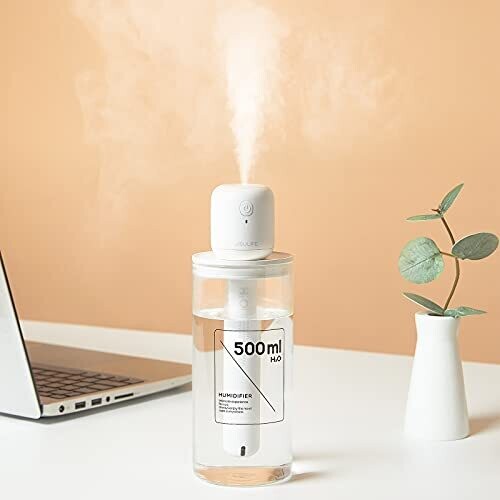
![Humidifiers for Bedroom Portable Mini Humidifier with 7-color Lights, Auto Shut-off Small Desk Humidifier [2 Mist Modes] Super Quiet Usb Personal Humidifier for Bedroom, Car, Office, Travel, Plants](https://airhumidifiers.com.au/images/products/322-humidifiers-for-bedroom-portable-mini-humidifier-with-7-color-lights-auto-shut-off-small-desk-humidifier-super-quiet-usb-personal-humidifier-for-bedroom-car-office-travel-plants-1.jpg)

FAQ
Why does my humidifier stop working after a few minutes?
Most often, auto shut-off or dry-run protection is triggered. Common reasons include low water level, a stuck float/water-level sensor, or mineral build-up on the mist/ultrasonic area. Try refilling to the correct level, cleaning the mist area, and testing again after a short power-off reset.
My humidifier light turns on, but there’s no mist. What should I check first?
Start with the power path: try a different USB cable and a known-good charger/power source (for USB powered models). Then check tank seating and water level. If power is fine and the tank is full, clean the ultrasonic/mist area to remove scale.
How do I know if the float or water sensor is the problem?
If the humidifier repeatedly stops while the tank still has water, or it stops immediately after turning on, the float/sensor may be misreading due to residue or scale. Cleaning and re-seating the tank are the best first steps before considering replacement.
Can dirty water or hard water cause a humidifier to stop misting?
Yes. Hard water deposits can clog the ultrasonic disc and interfere with sensors, leading to weak output or complete mist failure. Use fresh water each time and consider filtered water to slow scale build-up.
Should I replace my humidifier if cleaning doesn’t fix it?
If you’ve cleaned the mist area, verified correct water level and tank seating, and tested power with a different cable/charger (or confirmed charging for rechargeable models), replacement is reasonable—especially if auto shut-off continues to trigger incorrectly or the unit never produces mist.
What’s the fastest way to troubleshoot a portable humidifier?
Use a short sequence: confirm power (USB cable/adapter or charge completion), fill to the minimum/maximum line, re-seat the tank, then clean the mist area. If it has two mist modes, switch modes and wait a couple of minutes to rule out intermittent operation.
Which related humidifier features can reduce “not working” issues?
Look for auto shut-off (it prevents dry running and clearly indicates low-water behavior), two mist modes/spray modes (helps confirm settings), and reliable USB/rechargeable power (makes power troubleshooting easier). Options like Jisulife Mini Portable Humidifiers, 8-14 Hrs Travel Personal Battery Operated Humidifier with Container Diversity, Auto Shut-off, Ultra-quiet, Usb Rechargeable Humidifier for Travel/car/office/plants and Smartdevil Small Humidifiers, Desk Humidifiers, 500ml, Whisper-quiet Operation, Night Light Function, Two Spray Modes,auto Shut-off for Bedroom, Babies Room, Office, Home (white) include protections and mode controls that make diagnosis more straightforward.
LIKED THIS ARTICLE? SHARE IT: